How Much Does Google Ads Cost: how much does google ads cost in the UK?
So, what is the real cost of running Google Ads?
It is the first question on everyone’s mind, and the honest answer is… it depends. On average, you will find UK businesses investing anywhere from £1,000 to £10,000 a month into their Google Ads campaigns. But this is not a fixed price. Think of it less like a subscription and more like a tap you can turn up or down. Your actual spend is in your hands, dictated by your industry, your goals, and how smartly you manage your account.
Your Quick Answer to Google Ads Costs in the UK
Before we dive deep, let us clear up the biggest misconception. Google Ads is not a static expense; it is a dynamic investment. Imagine it is the fuel budget for your car. How much you put in the tank determines how far you can travel, but it is the car’s efficiency—or in this case, your campaign’s effectiveness—that dictates the value you get from every pound spent.
At its core, Google Ads is a live auction. You bid against competitors for the keywords your customers are searching for. But here is the twist: the highest bidder does not automatically win. Google’s system is built to reward relevance and quality. A brilliant, well crafted ad can actually earn a top spot for a lower price than a lazy, irrelevant one.
What Your Budget Can Achieve
To put some real world context on this, let us break down what different monthly budgets could look like for a small to medium sized UK business. This table gives you a rough idea of where your investment might fit and the kind of traction you could expect.
Typical UK Google Ads Monthly Budget Scenarios
| Budget Level | Typical Monthly Spend | Estimated Clicks (at £2.50 Avg. CPC) | Potential Audience |
|---|---|---|---|
| Starter | £500 - £1,500 | 200 - 600 | Localised or highly niche |
| Growth | £1,500 - £5,000 | 600 - 2,000 | Regional or broader niche |
| Scale | £5,000 - £10,000+ | 2,000 - 4,000+ | National or competitive market |
Of course, these are just ballpark figures. The actual results hinge on the variables we are about to cover.
Key Cost Variables to Consider
Your final spend is controlled by a few critical factors. We will get into the nitty gritty later, but for now, here are the main levers you need to be aware of:
- Industry Competition: It is a different ball game for a local bakery versus a national law firm. More competition means you will need to bid higher to be seen.
- Keyword Choice: Bidding on a broad term like "shoes" will cost a lot more than a specific phrase like "waterproof running trainers for men". Specificity is your friend.
- Ad Quality: This is a big one. Google’s Quality Score is a rating of how relevant your ad, keywords, and landing page are to a user. A higher score is a reward for good work—it directly leads to lower costs and better ad positions.
In 2025, the average cost per click (CPC) for a UK business can sit anywhere from £0.50 to £3.50 . But in fiercely competitive sectors like legal or financial services, that can easily jump to £5.00–£15.00 . For some ultra specific, high value keywords, it can even push past that. You can read the full research on these 2025 UK findings over at breezedevelopment.co.uk.
Ultimately, the goal is not just to spend money—it is to build a cost effective advertising engine that delivers a real, measurable return for your business. This is just the starting point.
Understanding the Google Ads Auction
To get a real grip on how much Google Ads costs, you have to understand where your money actually goes. A lot of people new to the game think it is just a case of the highest bidder nabbing the top spot, but that is a huge misconception. The reality is much more interesting – and it is a massive opportunity for smart advertisers to get way more bang for their buck.
Think of it like a high end art auction. Two people want the same painting. One, a complete unknown, bids £10,000 . The other, a world renowned and respected collector, bids £8,000 . The gallery might just favour the reputable collector, not because they bid the most, but because their involvement adds prestige and value. The Google Ads auction works on a very similar principle, rewarding quality and relevance, not just who has the deepest pockets.
It All Starts with Ad Rank
Every single time someone searches on Google, a lightning fast auction kicks off to decide which ads appear and in what order. The winner is not just the highest bidder; it is determined by a metric called Ad Rank .
It is a simple but powerful formula that sits at the heart of Google Ads:
Ad Rank = Your Maximum Bid x Your Quality Score
Your maximum bid (or Max CPC) is exactly what it sounds like: the most you are willing to pay for a single click. But the secret ingredient, the bit that changes everything, is your Quality Score . This is Google's rating of your ads, keywords, and landing pages on a scale from 1 to 10 .
A high Quality Score tells Google that you are giving its users exactly what they want. And because Google's number one priority is user experience, it actively rewards advertisers who help them deliver it.
Why Quality Score Is Your Best Friend
Think of your Quality Score as your reputation at the auction house. A stellar reputation means you can win the prize even with a lower bid. This is the absolute key to running a cost effective Google Ads account.
So, what does Google look at to figure out your score? It boils down to three core things:
- Expected Click-Through Rate (CTR): Based on past performance, how likely is someone to click your ad when they see it?
- Ad Relevance: Does your ad copy actually match what the person searched for? A highly specific ad always beats a generic one.
- Landing Page Experience: After the click, does your page deliver on the ad's promise? Is it relevant, easy to use, and quick to load, especially on mobile?
A high Quality Score is a direct signal to Google that you are a top tier advertiser. The reward? A discount on your clicks.
How Your Actual Cost Per Click Is Calculated
Now for the best part. You almost never pay your maximum bid. The price you actually pay for a click (your actual CPC ) is calculated to be just enough to beat the advertiser ranked directly below you.
The formula looks like this:
Your Actual CPC = (Ad Rank of the ad below you / Your Quality Score) + £0.01
The maths here is simple: a higher Quality Score directly lowers what you have to pay to hold your position. An advertiser with a Quality Score of 10/10 could pay a fraction of the cost per click compared to a competitor with a lazy 4/10 score, even while appearing higher up the page.
Mastering this auction dynamic is the foundation of any successful advertising strategy. By obsessing over your Quality Score, you can systematically drive down your ad spend while simultaneously boosting your ad positions and getting in front of more of the right customers.
The Key Factors That Influence Your Ad Spend
Now that you have got the hang of the auction, let us look at the levers you can actually pull to manage your costs. How much you pay for Google Ads is not a fixed price; it is the result of several interconnected factors that you can directly influence.
Think of it like the running cost of a car. It is not just about the price of petrol. It is also about how efficiently you drive, the routes you take, and the condition of the engine.
Mastering these elements is the key to turning your ad budget from a simple expense into a powerful, predictable driver of business growth. Each factor is an opportunity to get smarter, lower your costs, and improve your results.
Industry and Keyword Competitiveness
The single biggest influence on your Google Ads cost is the industry you are in. Some sectors are just more competitive, and that drives up the price for a click. A local bakery bidding on "sourdough bread in Devon" will face way less competition and lower costs than a national law firm bidding on "personal injury solicitor UK".
Why? Because the potential value of a single customer is vastly different. A successful click for that law firm could be worth thousands of pounds, making a £10 cost per click (CPC) a perfectly sound investment. For the bakery, where an average sale is much smaller, a CPC of just £1.50 might be pushing it.
Your industry sets the baseline for your costs. Highly competitive markets like legal services, finance, and home improvement consistently see higher CPCs because the value of a new customer is exceptionally high, justifying a larger advertising investment.
To handle this, your choice of keywords is everything. Instead of targeting broad, expensive terms like "accountant", a smarter approach is to go after long tail keywords. These are longer, more specific phrases that show someone knows what they want, like "small business tax advice for startups". They have lower search volume, sure, but they are typically less competitive, cost less per click, and bring in a much more qualified audience.
The Power of Quality Score
We touched on this in the auction, but your Quality Score is Google's rating of how relevant and high quality your ads, keywords, and landing pages are. It is, without a doubt, the most powerful tool you have for cutting your ad spend.
A high Quality Score tells Google you are giving its users a great experience. As a reward, they give you lower costs and better ad positions. It is a win-win.
This diagram shows how your bid and Quality Score work together to create your Ad Rank, which decides your ad's position and how much you pay.
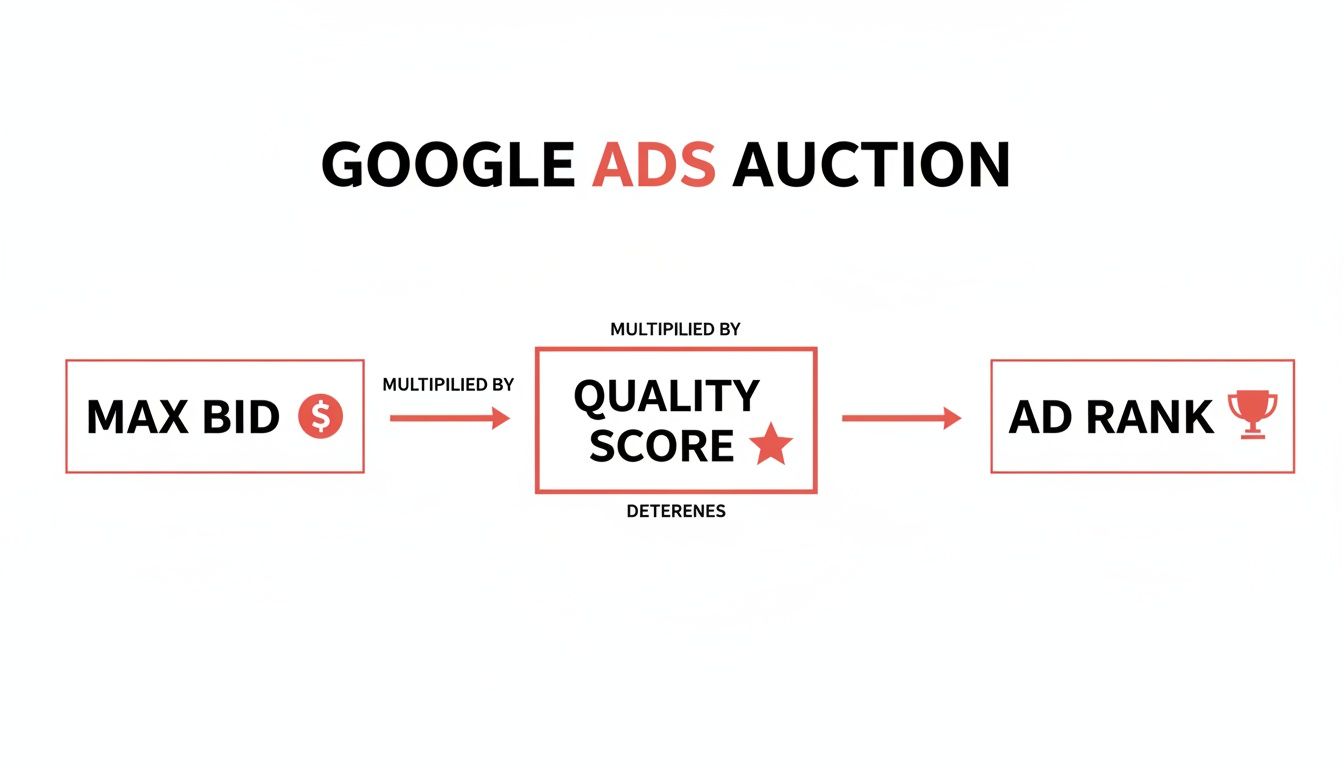
The key takeaway here is that a brilliant Quality Score can let you outrank a competitor who is bidding more than you, while you pay less per click. It is Google’s way of levelling the playing field, making sure relevance is just as important as a big budget. Constantly working to improve your score is not just a good idea; it is non-negotiable for running cost effective campaigns.
Strategic Location and Device Targeting
Where and on what device your ads show up has a massive impact on your budget. You have pinpoint control over these settings, which means you can focus your spend where it will actually make a difference.
-
Geotargeting: Do you serve customers nationally, or only within a specific city or county? Targeting the entire UK when your customers are all in Manchester is a surefire way to burn through your cash. By narrowing your focus to relevant areas, you stop paying for useless clicks and put your budget in front of people who can actually buy from you.
-
Device Targeting: People behave very differently on mobile, desktop, and tablet. Someone searching for "emergency plumber near me" on their phone is probably in a hurry and ready to call. In contrast, someone browsing "kitchen renovation ideas" on a desktop is likely in the early research phase. You can, and should, adjust your bids for each device to prioritise the most valuable traffic.
For many UK service businesses, mobile traffic is gold because of the high intent of 'on the go' searches. By setting a positive bid adjustment for mobile, you can make sure your ads are front and centre for these high value users.
Choosing the Right Bidding Strategy
Your bidding strategy is you telling Google how to spend your money to hit your goals. This is not a 'set and forget' option; the right strategy changes depending on your campaign's objectives and how long it has been running.
Here are a few of the usual suspects:
-
Maximise Clicks: This automated strategy tries to get you the most clicks possible within your daily budget. It is a solid choice for new campaigns where the goal is to drive traffic and get some initial data. The catch? It does not care about click quality , so you need to keep a close eye on it.
-
Target CPA (Cost Per Acquisition): Once you have enough conversion data, this strategy lets you tell Google to aim for a specific cost for each conversion (like a form fill or a sale). It uses machine learning to find people likely to convert at your target price, making it a seriously powerful tool for controlling lead costs.
-
Manual CPC: This gives you the ultimate control, letting you set a maximum bid for every single keyword. It is more hands on, but it is fantastic for advertisers who want to be precise with their spend and react instantly to what the data is telling them.
Picking the wrong strategy can mean overspending or leaving money on the table. For example, using 'Maximise Clicks' when you really want sales is far less efficient than using 'Target CPA'. Aligning your bidding strategy with your business goals is a fundamental step in managing how much Google Ads costs you.
How to Set a Realistic Google Ads Budget

Right, this is where the theory stops and the action begins. The biggest mistake businesses make is picking a budget out of thin air. A proper, realistic budget does not start with what you want to spend; it starts with what you need to achieve.
The best way to figure this out is to work backwards from your goals. At the heart of it all is a simple question: what is the most you can afford to pay for a new customer and still make a profit? This is not just an ad metric—it is a fundamental business number called your maximum Cost Per Acquisition (CPA) .
Nailing this down means getting a firm grip on your business's finances, including knowing how to calculate operating expenses. Once you know your numbers, you can build a budget that actually makes commercial sense.
Working Backwards From Your Revenue Goals
Let us make this real. Imagine you run a plumbing business here in the UK, and you want Google Ads to bring in more boiler installation jobs. Forget clicks and impressions for a second; let us start with the value of a customer.
First, the value of the job:
- Average Revenue per Job: £2,000
- Profit Margin: 25%
- Total Profit per Job: £500 (£2,000 x 0.25)
Now, how much of that profit are you willing to put back into marketing to get the next customer? A good, aggressive starting point is to reinvest 50% .
- Maximum CPA: £250 (£500 x 0.50)
And there you have it. That £250 is your magic number. Any new customer you get for less than that is pure profit. It is the anchor for your entire budget.
From Target CPA to a Monthly Budget
With your maximum CPA sorted, you can now build out a full monthly budget. This involves a few educated guesses about your website's performance, but do not worry—these are just starting points that you will refine with real data once the ads are live.
Let us stick with our plumber:
- Monthly Goal: 10 new boiler jobs
- Maximum CPA: £250
- Total Ad Spend for Goal: £2,500 (10 jobs x £250)
But hold on. That £2,500 is what you are willing to spend to get those 10 conversions , not your total budget for all the clicks it will take to get them. To work that out, you need to factor in your website's conversion rate.
Let us assume your landing page has a 2% conversion rate . That means for every 100 people who click your ad, two become a customer. So, to hit your target of 10 customers, you will need 500 clicks (10 ÷ 0.02).
Finally, we need to estimate the cost of each click. For trades in the UK, a £3.00 Cost Per Click (CPC) is a pretty solid estimate to start with.
- Total Clicks Needed: 500
- Estimated CPC: £3.00
- Calculated Monthly Budget: £1,500 (500 clicks x £3.00)
So, a £1,500 monthly budget is a realistic, data backed starting point to hit that goal of 10 new jobs. More importantly, it is a budget that is tied directly to profitability from day one. You can get more practical advice on building and scaling these campaigns in our complete guide to https://www.superhub.biz/your-guide-to-ppc-management-uk.
To make it even clearer, here is a table that walks you through the process.
Example Budget Calculation for a UK Service Business
| Metric | Example Value | Calculation Step |
|---|---|---|
| Monthly New Customer Goal | 10 | This is your primary business objective. |
| Average Revenue per Customer | £2,000 | The total value a new customer brings in. |
| Profit Margin | 25% | Your profit percentage after all costs. |
| Profit per Customer | £500 | £2,000
x 25%
|
| Maximum CPA (Target) | £250 | How much profit you'll reinvest ( £500
x 50%
). |
| Website Conversion Rate (Estimate) | 2% | The percentage of visitors who become customers. |
| Clicks Needed for Goal | 500 | 10 customers
/ 2% conversion rate
|
| Average CPC (Estimate) | £3.00 | The estimated cost for a single click. |
| Starting Monthly Budget | £1,500 | 500 clicks
x £3.00 CPC
|
This simple, reverse engineered approach moves you from guesswork to a strategic investment based on your actual business economics.
Recommended Starting Budgets for UK Businesses
While the formula is the ideal way to go, sometimes you just need a sensible number to get started. The first few months of any campaign are for gathering data, not necessarily printing money. You have to spend enough to give Google’s algorithm the information it needs to learn and optimise.
For UK small businesses in 2025, a realistic monthly Google Ads budget falls between £3,000 and £10,000 . This range gives you enough firepower to test keywords properly, run remarketing campaigns, and get to profitability without being starved of data.
Spending less than this often means your campaigns get stuck in Google's 'learning phase' for too long, which can completely kill your momentum.
As a rough guide, here are some typical starting points for different UK businesses:
- Local Service Businesses (e.g., electricians, cleaners): A budget of £750 - £2,000 per month is usually enough to get things moving, dominate a local area, and generate a solid stream of enquiries.
- National E-commerce Brands: To compete UK-wide, you need a bigger budget to test more keywords and run effective Shopping campaigns. Think £2,500 - £7,500 per month as a starting point.
- High Value B2B Services (e.g., software, consulting): With longer sales cycles and much higher customer lifetime values, you will need a budget of £4,000+ per month to gather enough data and stay in the game.
Proven Strategies to Lower Your Ad Costs
Once you have got a sensible budget locked in, the real work begins: making every single pound pull its weight. You do not need a colossal budget to win at Google Ads. What you do need is a sharp, disciplined strategy to boost your return on investment and slash wasted spend.
Think of these proven tactics as your toolkit for driving down costs. By obsessing over relevance, targeting, and the user's experience, you can systematically make your campaigns more efficient and get far more bang for your buck.
Boost Your Quality Score
As we have covered, Quality Score is basically Google’s reward system for relevance. A high score means you pay less for each click and secure better ad positions. Honestly, improving it is the single most powerful way to lower your ad spend.
Start with your ad copy. It needs to be super relevant to your keywords and tell the user exactly what they will get when they click. A vague, generic ad will always cost you more and perform worse than a specific one that speaks directly to what the searcher is looking for.
Next up, your landing page. When someone clicks your ad, the page they land on has to be fast, mobile friendly, and deliver precisely what the ad promised. A clunky, slow, or irrelevant landing page is a guaranteed way to burn money. For a deep dive, check out our CRO guide on how to improve conversion rates fast.
Master Your Keyword Match Types
Wasted clicks are the fastest way to drain your budget, and this usually happens when you are using the wrong keyword match types. Getting your head around these is absolutely vital for controlling who sees your ads.
You have got three main types to play with:
- Broad Match: This gives Google the most freedom, showing your ad for searches related to your keyword. Be very careful with this one – it can bring in a lot of completely irrelevant traffic if you are not managing it closely.
- Phrase Match: Your ad shows for searches that include the meaning of your keyword. It is a great middle ground, giving you a decent balance of reach and control.
- Exact Match: This is your most targeted option. Your ad only shows for searches with the same meaning or intent as your keyword, giving you maximum control over your spend.
By starting with more restrictive types like phrase and exact match , you force your budget to be spent only on the most relevant searches. This precision stops you from paying for clicks from people who were never going to buy from you anyway.
Build a Robust Negative Keyword List
Your negative keyword list is just as crucial as the keywords you are actually targeting. It is how you tell Google which search terms you do not want your ads showing up for. This is your number one tool for filtering out tyre kickers and unqualified traffic.
For example, if you sell premium leather shoes, you would add terms like "cheap," "second hand," and "repair" to your negative keyword list. This simple action stops your ad from appearing for people looking for something you do not offer, saving you from a pointless click and a wasted bit of budget.
Make a habit of checking your search term report regularly. This report shows you exactly what people typed to trigger your ads, and it is a goldmine for finding new negative keywords. Constant refinement is the name of the game here.
Use Ad Scheduling to Maximise Conversions
Think about it: your customers are not searching for what you sell 24/7 . Ad scheduling lets you show your ads only during the days and hours when your audience is most active and most likely to convert into a customer.
Dig into your campaign data to find your peak performance times. A B2B company might find conversions spike between 9 am and 5 pm, Monday to Friday. An e-commerce store, on the other hand, might see its best results on evenings and weekends.
By focusing your budget on these high converting windows, you stop wasting money during quiet periods when clicks rarely turn into sales. It is a simple tweak that makes sure your budget is working its hardest when it matters most.
Managing Ads In-House vs. Hiring an Agency
Figuring out who should manage your Google Ads account is a huge decision for any business. The right answer really boils down to your budget, how much time you can spare, and what your ambitions are for growth. It is about making the shift from simply ‘spending’ money on ads to strategically ‘investing’ in predictable returns.
At the start, managing your campaigns yourself can make a lot of sense. If you are working with a smaller, more manageable budget and have someone on the team with the time and willingness to get to grips with the platform, the in house route is a perfectly good starting point.
This hands on approach gives you total control and a direct line to your customer data. The catch? The learning curve is incredibly steep, and early mistakes can get expensive, fast.
When to Manage Your Ads In-House
Going it alone tends to work best in a few specific scenarios. You should probably consider keeping your ad management in house if:
- Your Budget is Limited: With a smaller spend, it is logical to handle campaigns yourself to make every single pound count.
- You Have Time to Learn: Getting good results demands a real commitment. It is not a set and forget task; it requires daily attention and a constant desire to learn.
- Your Campaigns are Simple: If you are just targeting a small local area with a handful of services, the complexity is much lower and easier to manage.
Clear Signals It Is Time to Hire a Professional Agency
As your business scales, the cracks in a DIY approach often start to show. The time you sink into trying to keep up with Google's constant updates and complex optimisation techniques can quickly start to cost more than hiring an expert.
This is the point where partnering with a specialist agency becomes the obvious next step. As you weigh up your options, looking into practical guides like how to create impactful video ads can give you a better sense of what is involved, whether you are skilling up your own team or judging what an agency can bring to the table.
The real reason to hire an agency is not just about saving time—it is about unlocking growth. A good agency brings a depth of experience from managing hundreds of accounts, which means they can get you results faster and far more efficiently.
It is definitely time to look for expert help when you notice these signs:
- You are ready to scale up your budget and need to guarantee a positive return on that investment.
- You are up against fierce competition and need a serious edge to stand out.
- You simply lack the time or the deep expertise needed to make your campaigns consistently profitable.
Making the right choice here is critical. For a deeper dive, read our detailed article on choosing a PPC marketing company in the UK.
Your Google Ads Questions, Answered
To wrap things up, let us tackle a few of the most common questions UK business owners ask about budgeting for Google Ads.
Can I Really Run Google Ads in the UK for Just £100 a Month?
Technically, yes, but it is a bit like trying to fill a swimming pool with a teaspoon. A £100 budget simply will not generate enough clicks to give Google’s algorithm the data it needs to learn and optimise.
You might get a handful of visitors, but you will have no real insight into what is working. It is almost impossible to achieve a positive return with a budget that small in most competitive UK markets.
How Long Until I See a Return on My Investment?
Patience is key here. Think of the first one to three months as a critical data gathering phase. While some campaigns strike gold early, it usually takes this long to collect enough performance data to make smart decisions.
This is the period where we refine targeting, test ad copy, and figure out what truly resonates with your audience. Your exact timeline will hinge on your industry, sales cycle, and how actively the campaign is managed.
Rushing to judge a campaign in the first few weeks is one of the most common mistakes we see. It often leads businesses to pull the plug on a strategy that was just about to find its feet.
Does My Website's Quality Actually Affect My Ad Costs?
Absolutely. In fact, it is one of the most overlooked factors. Your landing page experience is a massive part of your Quality Score .
If your site is slow, confusing to navigate, or does not work well on a mobile phone, Google will penalise you with a lower score. This directly translates to higher click costs. On the flip side, Google rewards advertisers who provide a great user experience with cheaper clicks and better ad positions. Investing in a quality landing page is not just a web design issue; it is a direct lever to pull to reduce your ad spend.
Ready to stop guessing and start seeing a real return on your advertising spend? The team at Superhub specialises in creating and managing high performance Google Ads campaigns that drive predictable growth. Book a free consultation with us today to find out how we can help your business thrive.
Want This Done For You?
SuperHub helps UK brands with video, content, SEO and marketing that actually drives revenue. No vanity metrics. No bullsh*t.