What is a content management system? Your guide to choosing the right CMS
Ever tried to update your own website and felt like you needed a degree in computer science just to change a headline? That's the problem a Content Management System (CMS) was built to solve.
Simply put, a CMS is the software that lets you create, edit, and publish content on your website without having to mess around with code. Think of it as the friendly control panel for your entire digital presence. It handles all the complicated, technical stuff behind the scenes, so you can focus on what really matters: your content.
Unpacking the Content Management System

Here's a simple analogy. Imagine your website is a new house. Building it from scratch without a CMS is like having to call in architects and builders every time you want to hang a picture or paint a wall. It’s expensive, slow, and requires specialist skills.
A CMS, on the other hand, hands you the keys. You get to be the interior designer, moving furniture, adding new art, and changing the colours whenever you want. No builders required.
The magic of a CMS lies in how it separates the content (your words, your images, your videos) from the design (the code and templates that make it all look good). This fundamental split is what empowers marketers, business owners, and creators to take the reins and manage their own site.
The Two Core Parts of a Content Management System
So, how does it actually work? Under the bonnet, every CMS has two key parts working in harmony. One is the part you see and use to add content, and the other is the engine that takes that content and shows it to your visitors.
Let’s break them down.
The Two Core Parts of a Content Management System
| Component | What It Does | Who Uses It |
|---|---|---|
| Content Management Application (CMA) | This is your creative dashboard. It's the user-friendly interface where you write blog posts, upload photos, and organise all your content. | Content creators, marketers, editors, and business owners. |
| Content Delivery Application (CDA) | This is the behind-the-scenes powerhouse. It takes your content from the CMA, pulls the right design template, and serves it all up as a finished webpage to your visitors. | This part works automatically, serving developers and, ultimately, your website visitors. |
This clever two-part system is what allows people with zero technical expertise to manage incredibly sophisticated websites. For anyone serious about mastering the art of managing a website , understanding this is the first crucial step.
And businesses are catching on. The UK's content management software market pulled in £3.8 billion in revenue this year alone, with forecasts predicting it will soar to £6.7 billion by 2030 . That’s not just noise; it’s a clear signal that a solid CMS is no longer a nice-to-have but a must-have for staying competitive.
How a CMS Brings Your Digital Presence to Life

To really get what a CMS is, you need to peek behind the curtain and see how it turns an idea into a live webpage. The whole process is designed to be refreshingly simple, cutting out the technical gatekeepers and putting the power directly into the hands of content creators. It all starts in an editor that feels instantly familiar.
When a marketer wants to write a new blog post, they do not have to touch a single line of code. Instead, they log into an interface that looks and feels a lot like Microsoft Word or Google Docs. They just write, format their text, and drag in images. Simple.
This is a world away from the old-school method of building websites, where every tiny change meant painstakingly coding HTML and manually uploading files to a server. One of the biggest wins of a CMS is creating an efficient content creation workflow , from the first draft right through to hitting publish.
From Draft to Database
When the content is ready, the creator hits ‘Publish’. That one click kicks off a powerful chain reaction behind the scenes. The CMS grabs the text, images, and anything else, and files it away neatly in a structured database .
Think of the database as a perfectly organised digital library. Every blog post, product description, or customer testimonial is like a book, carefully catalogued and put on its own shelf. This separation of the what (your content) from the how (your design) is the secret sauce that makes a CMS so effective.
The real magic of a CMS is its ability to decouple what you say from how it looks. This allows you to update your message in minutes without ever risking the structural integrity or visual design of your website.
This organised approach keeps your content safe, secure, and ready to be pulled out and used in all sorts of ways. The next step is getting it from the ‘library’ and in front of your audience.
The Role of Templates
This is where the Content Delivery Application (CDA) part of the CMS steps in. It acts like a librarian, fetching the right piece of content from the database when a visitor lands on your site. It then merges this content with a predesigned template .
A template is just the visual blueprint for your webpage. It sets the rules for the layout, colours, fonts, and overall branding. The CMS intelligently pours your content into the right spots within this template, making sure every single page looks consistent and professional.
An Automotive Example in Action
Let’s see how this works in the real world for the UK automotive sector. Imagine a busy car dealership in Devon that needs to keep its online stock list updated constantly.
- The Goal: Add a newly arrived used car to the website, fast.
- The Process: The marketing manager logs into the CMS. They find a prebuilt 'Vehicle Listing' form with fields for make, model, year, mileage, price, and a photo gallery.
- The Action: They type in the details, upload a few high-quality photos, write a quick description, and click 'Publish'.
- The Result: Instantly, the CMS saves this info to the vehicle database and uses the 'Vehicle Listing' template to generate a new, perfectly formatted page on the live website. That new car also automatically appears on the main 'Used Cars' page.
Without a CMS, this job would need a developer and could take hours, if not days. With one, the dealership is in complete control, able to react to the market in real time. This agility is exactly how a CMS brings a digital presence to life.
Exploring the Main Types of Content Management Systems
Just as there is not one type of car for every journey, not all content management systems are built the same. Understanding the different architectures is the key to choosing a platform that truly aligns with your business goals, whether you're running a simple blog or a complex, multichannel digital empire.
The world of CMS platforms can be broken down into three main categories: Traditional , Headless , and Decoupled . Each offers a different approach to managing and delivering your content, with distinct advantages and trade-offs.
Think of a Traditional CMS as an all-inclusive package holiday. Everything you need—the content creation tools, the database, and the final website design—is bundled together in one neat package. This makes it straightforward and often easy to get started.
The All-in-One Approach of a Traditional CMS
A traditional, or ‘monolithic’, CMS is the model most people are familiar with. Platforms like WordPress and Joomla were built on this architecture, where the backend (where you manage content) and the frontend (what your visitors see) are tightly intertwined.
When you create a blog post, the CMS stores it in its database and then uses a theme or template to push it directly to your website. This tight coupling makes setup relatively simple for standard websites.
However, this simplicity comes with a limitation. Because the content and presentation are so closely linked, delivering that content to anything other than your website—like a mobile app, a smartwatch, or a digital kiosk—becomes a real headache, if not impossible.
The Ultimate Flexibility of a Headless CMS
Now, imagine an à la carte menu. You can order exactly what you want, and the kitchen (your content) is completely separate from the dining room (where it's presented). This is the core idea behind a Headless CMS .
In a headless architecture, the content management backend is completely detached—or ‘decoupled’—from the presentation layer. There is no frontend "head" attached. Instead, it serves up raw content via an API (Application Programming Interface).
This means your developers can build any frontend they want, using any technology they choose. The same piece of content from the CMS can be pulled into a website, an iOS app, an Android app, and even an in-store display simultaneously. This "create once, publish everywhere" approach offers incredible flexibility and future-proofs your content.
A headless CMS treats content as pure data, free from any design constraints. This empowers organisations to deliver consistent, synchronised brand experiences across an ever-growing number of digital touchpoints.
This model is perfect for businesses with ambitious multichannel strategies, like retailers needing to update product information across their website, mobile app, and point-of-sale systems all at once. For those exploring simpler solutions first, it is useful to look into a comparison of website builders as they often represent the most user-friendly end of the traditional model. You can explore this further in our ultimate comparison of the top 10 website builders.
The Hybrid Power of a Decoupled CMS
What if you want the best of both worlds? That's where a Decoupled CMS comes in. It offers a middle ground, giving you the user-friendly content creation tools of a traditional system while still separating the backend from the frontend.
A decoupled system still has a connected frontend and templates ready to go, making it easy for marketers to build and preview web pages. However, it also provides an API, just like a headless CMS. This hybrid approach gives you a ready-made website solution but keeps the flexibility to push content to other channels when you need to. It's a powerful compromise for teams who need both structure and freedom.
To make the differences clearer, let's break them down side by side.
Traditional vs Headless vs Decoupled CMS Comparison
| Feature | Traditional CMS | Headless CMS | Decoupled CMS |
|---|---|---|---|
| Architecture | Tightly coupled backend and frontend. | Completely separate backend and frontend. | Backend and frontend are separate but connected. |
| Flexibility | Limited to the provided website templates. | Extremely high; developers can use any frontend tech. | High; offers a default frontend plus API access. |
| Best For | Standard websites, blogs, and small business sites. | Multichannel experiences (web, apps, IoT). | Complex websites needing multichannel capabilities. |
| Marketer Friendliness | Very high; includes built-in page builders and previews. | Lower; marketers cannot preview content out of the box. | High; marketers have both preview tools and API options. |
Choosing the right type of content management system is a foundational decision that will shape your digital presence for years. A traditional CMS offers simplicity for straightforward projects. A headless CMS provides unmatched flexibility for a multiplatform future. And a decoupled CMS delivers a powerful, balanced hybrid solution.
9 Essential CMS Features Your Business Can't Ignore
Knowing the difference between a traditional and a headless CMS is one thing, but the real test is what it can actually do for you day to day. A modern CMS should be more than a publishing tool; it needs to be a powerhouse that makes your team faster, your website safer, and your business more competitive.
So, let's cut through the noise. These are the non-negotiables.
1. Granular User Roles and Permissions
This is one of the most critical yet easily overlooked features. When you're a small business, maybe one or two people manage everything. But what happens when you grow? You need to control who can do what.
That’s where specific user roles—like 'Author', 'Editor', and 'Administrator'—come in. A junior marketer can be given permission to write and save blog post drafts, but only a senior editor gets the power to hit 'publish'. This simple feature prevents costly mistakes, stops accidental changes to core website settings, and keeps your workflow organised and secure. Without it, you're asking for chaos.
2. Built-in SEO Tools
A great CMS should actively help you get found online. It shouldn’t be an afterthought. Features that give you direct control over your Search Engine Optimisation (SEO) are indispensable. They're not just nice-to-haves; they're foundational to your growth.
Your content team should be able to easily edit page titles, meta descriptions, URL slugs, and image alt text without needing a developer. Putting these tools directly in their hands is a massive advantage, helping your pages climb the search rankings. To get the full picture, see how this fits into the bigger puzzle in our guide on 10 essential website design best practices for 2025.
3. Version Control
Ever had that heart-stopping moment when someone accidentally deletes a huge chunk of a key landing page right before a launch? Version control is your undo button for that exact scenario.
It’s your website’s safety net. With just a few clicks, you can roll back to a previously saved version of any page, instantly reversing a mistake.
Version control provides a complete history of every change made to your content. It gives your team the freedom to experiment and the confidence to recover from any error.
This feature protects your hard work and gives everyone peace of mind, allowing your team to be more creative and less afraid of making a permanent mess.
4. Integration Capabilities
Your CMS does not work in isolation. Its real power is unlocked when it connects seamlessly with the other software that runs your business. This is where integration capabilities separate the basic platforms from the serious, enterprise-ready solutions.
A solid CMS should plug straight into your essential tools, such as:
- Customer Relationship Management (CRM) systems to capture and manage leads.
- Analytics platforms like Google Analytics to track how users behave on your site.
- Marketing automation software to nurture leads with targeted email campaigns.
These connections build a unified ecosystem where data flows freely between platforms. It kills off manual data entry and gives you far deeper insights into what your customers actually want. It is this demand for connectivity that’s driving huge growth in the market. The UK Web Content Management Market was valued at $649.5 million this year and is on track to hit $1,299 million by 2035 . Businesses need connected solutions, and the technology is racing to keep up.
The flowchart below shows how the different CMS architectures provide the foundation for these kinds of features.
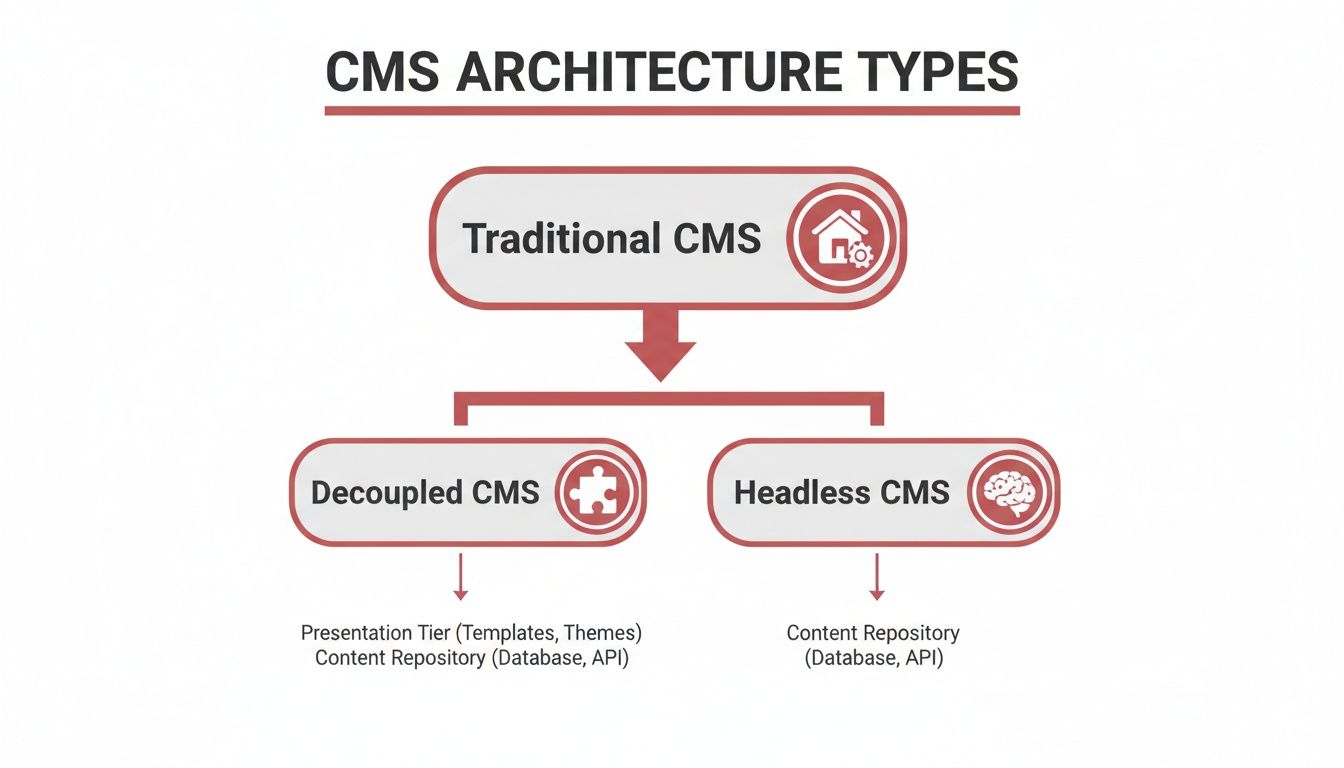
From the all-in-one Traditional model to the hyper-flexible Headless approach, each offers a different way to deliver these must-have features. When you're choosing a platform, make sure it not only ticks these boxes but has the muscle to support your business as it scales.
Choosing the Right CMS for Your Business Needs
Picking a content management system isn’t just an IT decision; it's a fundamental business move. The platform you choose today will define your team’s workflow, your marketing agility, and your ability to scale for years to come. The goal is to find a long-term asset, not a short-term band-aid.
To get it right, you need to look beyond a simple list of features. A handful of critical factors will help you cut through the noise and find a CMS that actually fits your company’s real-world needs, budget, and vision for the future.
Balancing Cost and Capability
The first hurdle for most businesses is cost. It’s easy to look at "free" open source platforms like WordPress and assume there are no costs involved, but that’s a common trap. While the software itself is free to download, you’re on the hook for the total cost of ownership.
This usually includes things like:
- Hosting: The server space where your website actually lives.
- Domain Name: Your website’s address on the internet.
- Themes and Plugins: Premium templates and extra features almost always come with a price tag.
- Developer Support: You'll need someone for customisation, security, and ongoing maintenance.
On the other hand, proprietary (or licensed) CMS platforms come with an upfront or recurring fee but often bundle everything—support, hosting, and security—into one neat package. This can bring predictability and peace of mind, which is a massive win for any business without a dedicated IT department. When weighing up your options, do not overlook hosting; understanding the real benefits of something like managed WordPress hosting can make a huge difference to your decision.
Planning for Future Scalability
What your business needs today is not what it will need in three years. So many companies make the mistake of picking a CMS that solves their immediate problems but completely stalls their future growth. A simple, user-friendly platform might be perfect for a local startup, but what happens when it’s time to expand nationwide?
Think about where you're headed. Are you planning to launch a mobile app? Do you see e-commerce in your future? Will you eventually serve content to different countries in multiple languages? Answering these questions now will help you decide between a traditional CMS and a more flexible headless or decoupled system that’s built to grow with you.
Your CMS shouldn't just support your business as it is today; it must be a platform that enables and accelerates your business as it evolves tomorrow.
Matching the CMS to Your Industry
Different industries have completely different needs. A motorsport team, for instance, needs a CMS that can handle massive high-resolution image galleries and video without breaking a sweat. A retail business, however, will be far more concerned with robust e-commerce integrations that connect seamlessly with inventory and payment gateways.
The UK content management market is being shaped by this very need for specialised, integrated tools. With the government pushing for digital transformation and private tech firms pledging a massive £14 billion towards AI, CMS providers are under pressure to deliver smarter, more connected solutions. As a result, UK organisations are demanding software that slots effortlessly into their existing digital toolkit. You can find more insights on the UK web content management market on marketsandmarkets.com.
Before you sign on the dotted line, ask yourself these crucial questions:
- Who will actually be using this thing? Is your team full of tech wizards, or do they need a simple drag and drop interface?
- What are our security requirements? If you handle sensitive customer data, you need enterprise-grade security. No compromises.
- How much customisation do we need? Are you happy with off-the-shelf templates, or does your brand demand a completely unique design?
- What integrations are non-negotiable? Does it have to talk to your CRM, your email marketing platform, or your analytics tools?
Thinking through these points will not just help you choose a CMS. It will help you find a powerful engine for your long-term success.
Common Questions About Content Management Systems
Diving into the world of content management systems always brings up a few questions. Once you get past the basic "what is it?" stage, the practical side of things starts to kick in. It is completely normal to have these queries, and we hear them all the time.
Let's cut through the noise and give you some straight answers. Our goal is to clear up any confusion so you can feel confident about what comes next for your digital strategy.
What Is the Difference Between a CMS and a Website Builder?
This is easily one of the most common questions, and a simple analogy works wonders here.
Think of a website builder like Wix or Squarespace as renting a fully furnished flat. It’s simple, everything is included, and you can move in almost immediately. The catch? Your customisation options are limited to what the landlord allows. You can’t exactly knock down a wall or build an extension.
A CMS, on the other hand, is like owning your own house. It takes more work to get started – you have to sort out the land (hosting) and the architecture (design) – but once it’s yours, you have total freedom. You can build whatever you want, modify it however you see fit, and create something truly unique.
Website builders offer convenience and speed, making them perfect for getting a simple site online quickly. A CMS offers real power, flexibility, and the ability to build a digital asset that grows with your business.
Ultimately, it boils down to control versus convenience. A builder is easy but keeps you within its walls. A CMS gives you endless possibilities, but you have to be ready to build.
Is WordPress the Only CMS I Should Consider?
Not at all. While WordPress powers a staggering 43% of all websites , it’s far from the only game in town. Its popularity is well earned – it’s flexible, has a massive community, and can do almost anything. But calling it the "best" for everyone is a big mistake.
The right CMS is always the one that best fits your specific project.
Different platforms are built for different jobs:
- Drupal is famous for its iron-clad security, which is why it’s a favourite for government sites and big companies handling sensitive information.
- Joomla strikes a great balance between the user-friendliness of WordPress and the raw power of Drupal, with fantastic multilingual support built-in from the start.
- Headless CMS platforms like Contentful or Strapi are the go-to for businesses needing to push content everywhere at once – a website, a mobile app, a digital kiosk – all from a single hub.
It’s crucial to look past the biggest name on the block. Your decision should be based on your unique goals for security, scale, and where your content needs to go.
How Much Does a CMS Actually Cost?
This is a "how long is a piece of string?" kind of question. The cost of a CMS can swing from apparently free to tens of thousands of pounds a year. The key is to think about the Total Cost of Ownership (TCO) , not just the upfront price.
Open source systems like WordPress are free to download, but they are certainly not free to run. You have to factor in recurring costs like web hosting, a domain name, and premium themes or plugins to get the features you really need. On top of that, you might need a developer for custom work, maintenance, and security, which all adds to the TCO.
On the other side of the coin, proprietary or commercial CMS platforms usually charge a monthly or annual licence fee. That fee might look steep at first, but it often includes dedicated support, managed hosting, and regular security updates. This all-in-one approach gives you predictable costs and peace of mind, making it a solid choice for businesses that do not have a big in-house IT team.
Can I Move My Website from One CMS to Another?
Yes, you absolutely can, but be warned: it’s a complex and delicate technical project. It is not as simple as copying and pasting. The process involves methodically exporting everything – all your posts, pages, images, user data, and settings – from the old system.
That data then has to be carefully mapped and imported into the new CMS’s structure. If it is done wrong, the results can be disastrous. We’re talking about serious data loss, a mess of broken links that frustrates users, and a sharp drop in your hard-earned SEO rankings.
Because the stakes are so high, a CMS migration is a job best left to an experienced web development partner. Professionals know how to handle the technical details, run thorough tests, and set up the right redirects to ensure a smooth transition that protects both your content and your visibility in search engines.
Choosing and implementing the right CMS is a foundational step in building a powerful digital presence. If you're ready to create a website that not only looks great but also works hard for your business, the expert team at Superhub is here to help. Discover how we can build the perfect digital platform for your brand by visiting us at https://www.superhub.biz.
Want This Done For You?
SuperHub helps UK brands with video, content, SEO and marketing that actually drives revenue. No vanity metrics. No bullsh*t.