Discover advertising cost on google: A Clear Budget Guide
When it comes to the advertising cost on Google , the first thing you need to know is there's no price list. Forget about picking something off a shelf. It’s much more like a live, fast paced auction for your ideal customer's attention, where the prices are always shifting.
How Google Ads Costs Are Actually Calculated
To get your head around Google's pricing, picture yourself trying to rent the best shopfront on a bustling high street. The spots with the most footfall—where all the potential buyers are walking past—are obviously going to cost you more. Google Ads runs on a very similar principle, but instead of a physical location, you're bidding for prime real estate on the search results page.
This digital auction is what decides how much you pay and where your ads show up. It all happens in the blink of an eye. Every single time someone searches on Google, an auction kicks off. Your ad goes head to head with others targeting the same keywords, and Google's system picks the winners based on a mix of how much you're willing to pay and how good your ad actually is.
The Core Pricing Models Explained
Your costs are ultimately shaped by the pricing model you pick, which needs to line up with what you're trying to achieve with your campaign. There are three main models you’ll come across:
- Cost Per Click (CPC): You pay every time someone clicks on your ad. Simple as that. It doesn't matter what they do once they land on your site. This is the go to model for most advertisers who want to drive traffic.
- Cost Per Mille (CPM): "Mille" is Latin for thousand, so you’re paying for every 1,000 times your ad is shown (an "impression"). Clicks are irrelevant here. This model is perfect for getting your brand name out there when pure visibility is the main goal.
- Cost Per Acquisition (CPA): With this one, you only pay when someone completes a specific, valuable action—like buying a product, filling out your contact form, or signing up for a newsletter. It’s a conversion focused model that ties your spending directly to tangible results.
To really get to grips with how your budget is spent, you've got to understand the building blocks like the Cost Per Click formula. It’s the foundation for most campaign budgets and is crucial for figuring out if you're getting a good return.
What Are the Average Costs in the UK?
While everything is in flux, having some benchmarks helps. On average, UK businesses have been looking at a Cost Per Click (CPC) of £3.53 across all industries. But that's just the headline figure.
Dig a little deeper, and you’ll see search ads typically cost around £2.04 per click , whereas ads on the display network are a lot cheaper at roughly £0.48 . It really pays to know where your industry sits in the grand scheme of things.
The key takeaway here is that your Google advertising cost isn't a fixed expense—it's a variable investment. The price you pay is a direct reflection of what a potential customer is worth to you and how much your competitors are prepared to spend to grab their attention.
This auction system ensures you're not just buying empty space; you're competing for genuine opportunities to connect with people who are actively looking for what you offer.
The table below gives you a quick snapshot of what to expect.
Average Google Ads Costs in the UK at a Glance
Here’s a quick summary of the typical costs UK businesses can expect for different Google Ads formats. Think of it as a rough guide to help with your initial planning.
| Ad Type | Average Cost Per Click (CPC) | Average Cost Per 1000 Impressions (CPM) |
|---|---|---|
| Search Ads | £1.50 - £3.00 | N/A (Typically CPC based) |
| Display Ads | £0.40 - £0.80 | £1.00 - £4.00 |
As you can see, the costs vary significantly based on where and how you choose to show your ads. This is why a clear strategy is non negotiable.
The Key Factors That Determine Your Ad Spend
So, you understand the basic pricing models. But the real head scratcher is why your Google ad costs might be wildly different from another business, even one in the same industry.
The answer isn't a fixed price list. Think of it more like a live auction where Google’s algorithm is constantly weighing up a bunch of interconnected factors. Learning what these levers are—and how to pull them—is the secret to getting a grip on your ad spend and actually seeing a return on it.
The Power of Your Quality Score
Right at the heart of what you pay is a metric called Quality Score . It's Google's 'relevance rating' for your ads, keywords, and landing pages, scored from 1 to 10. A high Quality Score is your best mate in the ad auction because Google literally rewards you for being relevant.
Imagine two businesses bidding on the same keyword. One has a great Quality Score of 8/10 , and the other is lagging with a 3/10 . Google sees the first business as more helpful to its users, so it gives them a discount. This means they can often win a better ad position for less money than their low scoring competitor.
In simple terms, a high Quality Score is like a permanent discount on your advertising. The more relevant you are to the user, the less Google charges you per click.
This whole system is designed to stop people from just throwing money at the problem. It forces advertisers to create genuinely good, user focused experiences.
How Competition Affects Your Costs
This one’s a biggie. If you’re targeting a keyword that loads of other businesses are bidding on, the price is going to shoot up. It’s simple supply and demand.
For example, a keyword like "personal injury solicitor London" is ridiculously competitive. Law firms will happily pay a premium for each click because one client could be worth tens of thousands of pounds. On the flip side, a niche keyword like "artisan sourdough delivery in Totnes" will have far less competition, making the cost per click much, much lower.
Getting a feel for the competitive landscape of your keywords is fundamental to setting a budget that isn’t pure fantasy.
Strategic Ad Scheduling and Location Targeting
When and where your ads show up has a direct impact on your wallet. Not all hours of the day or parts of the country are created equal.
-
Ad Scheduling: Does your ideal customer search for you during the 9 to 5 grind, in the evenings, or at the weekend? Running ads 24/7 sounds comprehensive, but it’s often just a fast way to burn through your budget when no one's looking. By scheduling ads for peak times, you focus your money where it’s most likely to convert.
-
Location Targeting: The cost of advertising can change dramatically from one place to another. Bidding on keywords across the entire UK will be far more expensive than focusing your efforts on a specific county like Devon, or even just a single city like Exeter. If you’re a local business, this is a no brainer—tight geotargeting makes sure you only pay to reach people who can actually become customers.
The Importance of Device Optimisation
Finally, the device someone is using—desktop, tablet, or mobile—plays a huge part in both cost and performance. Mobile searches now make up over 60% of all searches on Google, but that doesn't automatically mean they’re the most valuable for your business.
A user searching for an "emergency plumber near me" on their phone is probably ready to call someone right now. In contrast, someone researching complex B2B software on a desktop is likely in the early, information gathering stage. You can, and should, adjust your bids for different devices, paying more for the traffic that’s most likely to turn into a sale. For a deeper dive into building campaigns that actually work, our guide on PPC services in the UK has some brilliant, practical insights.
By getting a handle on each of these factors, you can stop just paying for ads and start strategically investing in them. It's how you make your budget work a hell of a lot harder.
How Ad Costs Vary Across UK Industries
Trying to set a Google Ads budget without knowing your industry's going rate is like setting sail without checking the weather forecast. You're heading for trouble. A one size fits all budget is a recipe for disaster because the cost of advertising on Google is anything but uniform.
The price you pay for a single click can swing wildly from one sector to another, and it all comes down to the fierce competition for a potential customer's attention.
This isn't random. It’s all driven by the potential value of landing a new customer. Industries where a single conversion can be worth thousands of pounds are naturally going to be more competitive. This pushes the cost per click ( CPC ) sky high as businesses are willing to pay a premium to attract that one golden lead.
On the other hand, sectors with lower value transactions or less immediate customer needs often get to enjoy much lower advertising costs. Let’s break down this contrast so you can set some realistic expectations for your own campaigns.
The Most Expensive Sectors for Google Ads in the UK
Some industries are just notorious for their eye watering Google advertising costs. These are usually the fields where the lifetime value of a customer is exceptionally high, which justifies a big upfront investment to get them through the door. Think of it as paying for a prime spot in a digital high street where the stakes are incredibly high.
A few of the priciest sectors include:
- Legal Services: Keywords like "divorce lawyer" or "personal injury claim" are insanely competitive. A single client can be worth a fortune, so law firms bid aggressively to get their attention.
- Insurance: This is another heavyweight contender. The long term value of a new policyholder means insurance companies are prepared to invest heavily to secure those clicks.
- Financial Services: From mortgages to investment advice, the financial sector is a battlefield. The potential return from a new client makes high CPCs a non negotiable part of the game.
The infographic below shows how the core factors—like competition—play a huge part in deciding these costs, no matter what industry you're in.
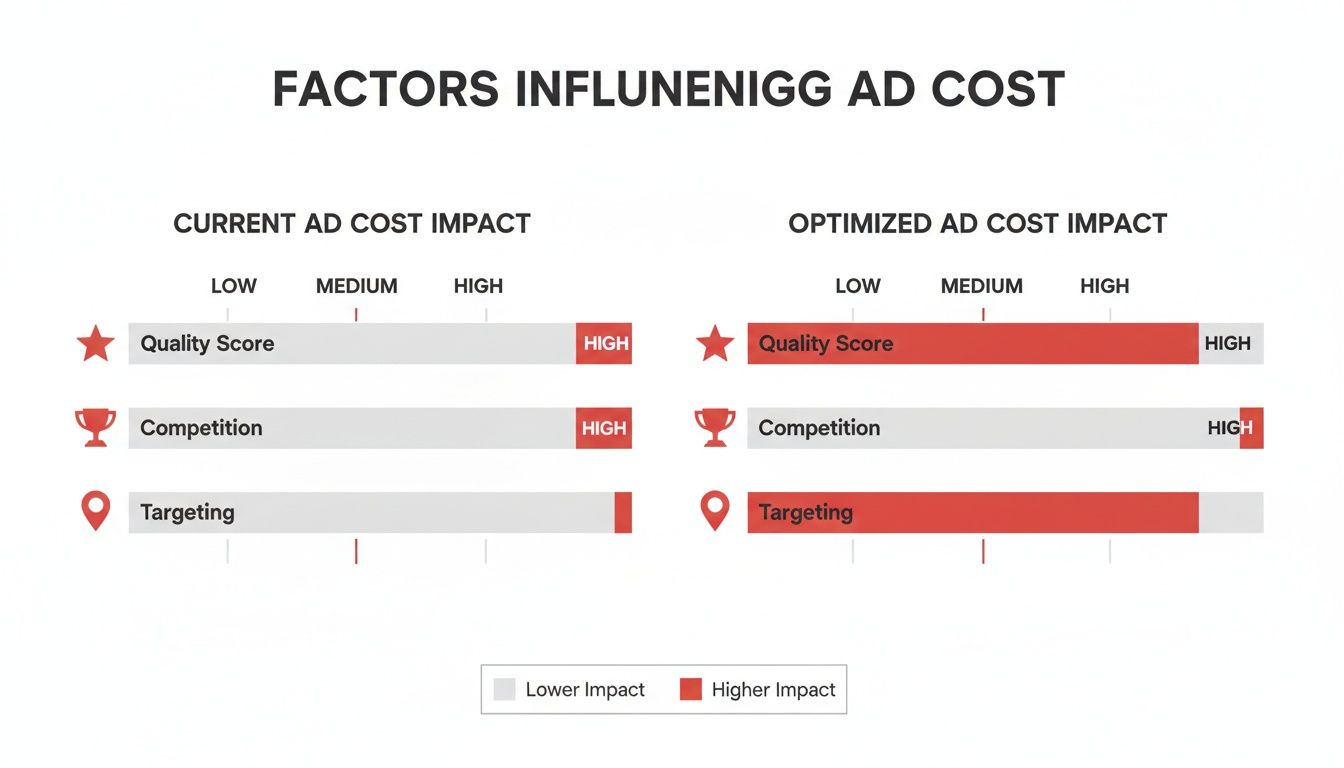
As the visual shows, it’s the combination of your Quality Score, how many competitors you're up against, and how tightly you've dialled in your targeting that all adds up to your final ad spend.
More Accessible Industries for Advertising
On the flip side, plenty of industries benefit from a much lower cost of entry. These are often sectors where the competition is less cut-throat, or the value per transaction is smaller, leading to more sensible bids in the ad auction.
For instance, e-commerce for things like clothing or hobbies, and even many local services, tend to have far more manageable CPCs. This doesn't mean they aren't competitive, but the ceiling for what a business is willing to pay per click is considerably lower than in the legal or financial worlds.
For a local Devon based business selling handmade crafts, the cost to reach a customer will be worlds away from a national insurance provider.
The key takeaway here is that your industry dictates your starting point. Knowing where you stand lets you build a smarter budget and a more effective strategy from day one, helping you avoid the shock of unexpectedly high costs.
A Look at Real UK Industry Data
Recent data on UK Google Ads costs really shows just how wide this gap can be.
In the UK, the insurance sector has been shown to have the highest average cost per click, hitting $7.24 USD . That makes it the most expensive niche for search advertising, full stop. In stark contrast, the pharmaceuticals industry saw an average CPC of just 26 US cents , proving just how wildly competition and what the customer is looking for can affect pricing. You can dig into these figures and find more insights about UK CPC variations on Statista.com.
This data proves that understanding your specific industry's benchmarks isn't just helpful—it’s essential. It gives you a proper feel for the competitive environment you’re stepping into and highlights the value of expert guidance to navigate these digital marketplaces and secure a solid return on your investment.
Choosing Smart Bidding Strategies to Maximise Your Budget
Knowing what affects your Google advertising cost is one thing. Actually controlling it is another game entirely. This is where your bidding strategy comes into play.
Think of it like choosing a driving mode in a modern car. Some modes are all about fuel efficiency, making every drop of petrol (your budget) go further. Others are built for pure performance, getting you to your destination (your business goal) as fast as possible.
Choosing the right strategy is about telling Google exactly what you want to achieve. Are you just trying to get your name out there? Or are you laser focused on ringing the till? Your answer dictates which "mode" you should be in.
Aligning Bidding with Your Business Goals
Google's bidding strategies are grouped around common marketing goals. When you pick one, you're giving Google’s AI clear instructions on how to spend your money to get the best possible outcome for what you care about most. It’s about spending smarter, not just spending more.
Let's break them down by three core objectives:
- Building Awareness: If your main aim is to get eyeballs on your brand, you’re not too worried about clicks or sales just yet. You just want to be seen. The go to strategy here is Target CPM (Cost Per Mille) , where you pay for every thousand times your ad is shown. You’re buying visibility, plain and simple.
- Driving Consideration: At this stage, you want people to actually engage with you. That usually means getting them to your website to find out more. The Maximise Clicks strategy is built for this, automatically bidding to get as many clicks as possible within your daily budget.
- Securing Conversions: This is where the magic happens. Your goal is to get people to take a specific, valuable action – making a purchase, filling out a form, picking up the phone. Strategies like Target CPA (Cost Per Acquisition) or Maximise Conversions tell Google to hunt for users most likely to convert, delivering a direct return on your investment.
Automated Bidding vs Manual Control
For years, advertisers had to manage every single bid by hand. It was a painstaking, time sapping process. Today, Google's AI powered automated bidding strategies do the heavy lifting for you.
These systems analyse millions of data points in real time to set the perfect bid for every single auction—a task no human could ever hope to match.
Smart Bidding uses machine learning to optimise for conversions or conversion value in each and every auction—a feature known as "auction time bidding". It factors in a huge range of signals to set bids, such as device, location, time of day, and user demographics.
This automated approach is incredibly powerful and, for most businesses, it's the only way to go. It's a core part of how modern campaigns are run, sharing a lot of its DNA with the automated systems used elsewhere in digital advertising. You can learn more by checking out our guide on what programmatic advertising is and how it all works.
But that doesn't mean manual bidding is dead and buried.
When to Consider Manual Bidding
While automated strategies are the default for a very good reason, there are times when taking back the steering wheel makes sense. Manual CPC bidding gives you absolute control, letting you set a maximum bid for each of your keywords.
This approach can be a smart move if you:
- Have a very small, tightly controlled budget and want to ensure you never, ever overpay for a click.
- Are launching a brand new campaign and don't have enough conversion data for the automated strategies to work their magic yet.
- Are a seasoned pro who wants to test a specific theory or has unique insights into your market that the AI might otherwise miss.
Ultimately, the choice comes down to your resources, your experience, and your goals. For most UK businesses, letting Google's AI handle the complexity is the most efficient way to maximise your budget and get a better return on your advertising cost on Google.
Actionable Tips to Reduce Your Google Advertising Cost
Knowing the theory behind Google Ads is one thing. Knowing how to actively cut your spend without killing your results is where the real money is made. Getting a better return isn't about slashing your budget; it’s about making every single pound work harder for you.
Think of this section as your practical checklist for immediate wins. These aren't long winded strategies but simple, actionable steps you can take today to trim the fat and make your campaigns more efficient.
Refine Your Ad Copy and Landing Pages
The single biggest lever you can pull to lower your costs is your Quality Score. And that all starts with your ads and the pages people land on when they click. It’s simple: Google rewards relevance with lower prices.
Your ad copy is the promise; your landing page is the delivery. They have to match perfectly. If your ad promises "emergency plumbing services in Exeter," your landing page had better scream those exact words and give people a clear, immediate way to get in touch.
When that experience is seamless, you're signalling to Google that you’re a high quality result for the searcher. That directly boosts your Quality Score, which in turn, reduces your cost per click. It’s the closest thing to a "discount" you'll ever get on the platform.
Master the Art of Negative Keywords
One of the fastest ways to burn through your budget is paying for clicks that have zero chance of ever converting. This is where negative keywords become your most important cost cutting tool.
Negative keywords are simply terms you tell Google not to show your ads for. They act as a filter, making sure your budget is only spent on reaching your ideal audience, not time wasters.
For example, a Devon based company selling premium, handmade wooden furniture should immediately add negative keywords like "free," "cheap," "DIY," and "flatpack." This instantly stops them from paying for clicks from bargain hunters who were never going to buy.
A well curated negative keyword list is the difference between a finely tuned campaign and a leaky bucket. Get into the habit of checking your Search Terms Report to find and block irrelevant queries that are draining your budget.
This one piece of housekeeping can instantly improve your return on investment by focusing every penny on traffic that actually matters.
Leverage Ad Extensions to Boost Engagement
Ad extensions are extra snippets of information—like your phone number, location, or links to specific pages on your site—that you can tack onto your ads. The best part? They don’t cost you anything extra.
Using extensions makes your ad physically bigger and more noticeable on the search results page, which naturally draws the eye and gets you more clicks. We consistently see that using multiple, relevant extensions can bump up an ad's click through rate ( CTR ) by several percentage points.
- Sitelink Extensions: Direct users to key pages like 'About Us' or 'Contact'.
- Call Extensions: Let mobile users call you directly from the ad. A must for service businesses.
- Location Extensions: Show your address and help local customers find you on the map.
- Structured Snippets: Highlight specific aspects of your products or services, like 'Brands' or 'Styles'.
A higher CTR tells Google your ad is highly relevant, which—you guessed it—feeds back into a better Quality Score. You don't just get more clicks; you can end up paying less for each one. It’s a completely free way to make your ads work harder.
How to Plan Your Budget and Forecast Results
Right, let's turn all this theory into something you can actually use. Planning your budget is where the rubber meets the road, transforming Google Ads from a mysterious cost into a predictable part of your growth machine. It’s about moving from guesswork to a solid financial plan.
The foundation of any good budget is data. And the good news? You don't need to spend a single penny to get started. Google's own Keyword Planner is your best friend here. It's a free tool that gives you a window into search volumes and estimated costs before you commit any cash.
You can pop in keywords relevant to your business—say, "emergency plumber in Devon"—and the tool will tell you roughly how many people are searching for it each month. Crucially, it also gives you an estimated cost per click ( CPC ) range, providing a realistic baseline for your sums.
From Sales Goals to Ad Spend
Once you have these cost estimates, you can work backwards from your business goals to figure out a sensible budget. This simple forecasting exercise is what connects your marketing spend directly to your bottom line.
Here’s a straightforward, step by step way to map it all out:
- Define Your Goal: Start with a clear, specific target. Let's imagine you want to land 10 new customers a month.
- Estimate Your Conversion Rate: Look at your website's current performance. What percentage of visitors turn into a lead or a sale? A typical rate to start with is 2% .
- Calculate Required Visitors: To get those 10 customers, you'll need 500 people to visit your website ( 10 customers / 0.02 conversion rate ). Simple maths.
- Forecast Your Ad Spend: If your estimated CPC from the Keyword Planner is around £2.00 , your monthly ad spend needs to be £1,000 ( 500 visitors x £2.00 CPC ).
Suddenly, a vague goal becomes a tangible budget. It’s a powerful way to justify your spend and set crystal clear expectations for what your campaigns should deliver.
A Sample Budget for a UK Business
So what does this look like in the real world? Here’s a sample monthly budget for a small UK business focused on generating leads.
| Budget Item | Monthly Cost | Notes |
|---|---|---|
| Google Ads Spend | £1,000 | Aimed at high intent search keywords. |
| Landing Page Software | £50 | For creating and testing optimised pages that convert. |
| Management/Optimisation | £350 | Agency fee or the time cost for in house staff. |
| Total Investment | £1,400 | The all in cost to acquire your new leads. |
When you're putting your budget together, it's absolutely vital to understand metrics like ROI vs. ROAS to know if you're actually making money. This makes sure you’re tracking real business growth, not just clicks. For a closer look at this, our guide on how to calculate customer acquisition cost in the UK is the perfect next step.
Got Questions About Google Ad Costs? We've Got Answers
We’ve pulled back the curtain on Google’s ad auction, looked at what drives your costs, and shared a few tricks for getting more from your budget. Now, let’s tackle the questions that almost every UK business owner asks when they’re starting out.
How Much Should a Small Business in the UK Actually Spend on Google Ads?
There's no magic number here, but for most small UK businesses, a good starting point is somewhere between £300 and £1,000 a month . This is usually enough cash to get your foot in the door in a local market or a specific niche, letting you gather some real world data without betting the farm.
The real secret is to start with a test budget you're comfortable losing. Pick one specific service or product, get laser focused on it, and track every penny. Once you see what's working and what isn't, you can start dialling up the spend with confidence.
Can You Run Google Ads for Free?
Short answer: no. Google Ads is a pay to play platform. But, Google does throw new advertisers a bone now and then with promotional credits, like their classic 'Spend £400, get £400' offer. It’s their way of giving you a leg up to get started.
There's also the Google Ad Grants programme , which offers free advertising to eligible non profits. If you're a for profit business, though, you'll need to open your wallet to compete in the ad auction.
While you can't advertise for free, smart optimisation is the next best thing. Things like improving your Quality Score or using ad extensions don't cost a penny, but they make your paid budget work much, much harder.
How Long Until I See Results from Google Ads?
You'll see traffic and clicks almost straight away. As soon as your ads are approved (which can take minutes or hours), they’ll start showing up, and you'll see people landing on your website.
But let's be clear: traffic isn't the same as results. Seeing a steady stream of leads or sales takes a bit more patience. Think of the first one to three months as the ‘learning phase’. This is where you’re collecting data, finding out what works, and fine tuning everything. A proper picture of your return on investment really only starts to take shape after that initial bedding in period.
Ready to stop guessing and start getting real results from your Google Ads? The expert team at Superhub specialises in creating data driven campaigns that maximise your budget and deliver tangible growth. Get in touch with us today to see how we can help your business thrive.
Want This Done For You?
SuperHub helps UK brands with video, content, SEO and marketing that actually drives revenue. No vanity metrics. No bullsh*t.